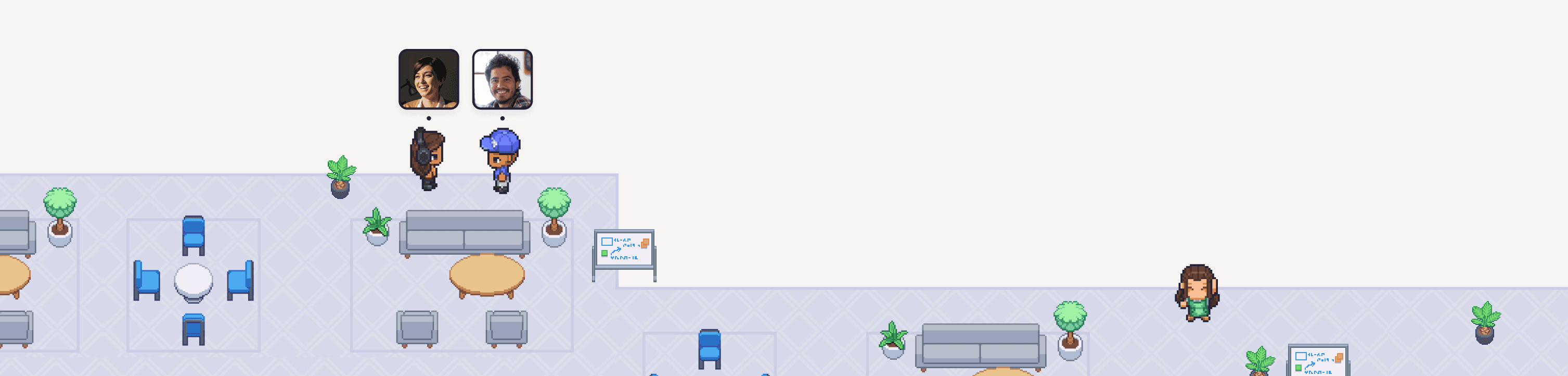
O áudio espacial do Gather é super único em comparação com as ferramentas tradicionais de colaboração! Em vez de entrar em uma sala de reunião fixa, aqui as conversas são espontâneas e fluidas. Qualquer pessoa pode simplesmente caminhar até um colega de equipe e começar a conversar. Quanto mais perto você estiver, mais alto o ouvirá. Afaste-se um pouco, e o som vai sumindo de leve.
Tudo isso acontece em um mundo virtual dinâmico, acessado por usuários de todas as partes do mundo real! É um sistema complexo e, para funcionar perfeitamente, a estrutura de áudio por trás dele precisa ser super sólida.
Quando lançamos o Gather 2.0 em setembro de 2025, ela ainda não estava nesse nível. As reclamações chegaram rápido e, para resolver isso, decidimos reconstruir toda a nossa estrutura de áudio do zero!
Hoje, temos a alegria de compartilhar que o sistema de Áudio/Vídeo do Gather 2.0 é o mais confiável que já construímos, com uma redução de 50% nas avaliações baixas desde o lançamento!
Esta é a história de como chegamos lá, uma celebração do incrível trabalho de engenharia que tornou isso realidade e uma prévia do que vem por aí para o AV no Gather.
O que aconteceu no lançamento
O Gather 2.0 foi um grande lançamento! Redesenhamos a interface de usuário, recriamos toda a arte em pixel art, adicionamos novas integrações (Spotify e GitHub) e trouxemos controles de áudio espacial mais detalhados, permitindo que os usuários ajustem exatamente como o som se comporta.
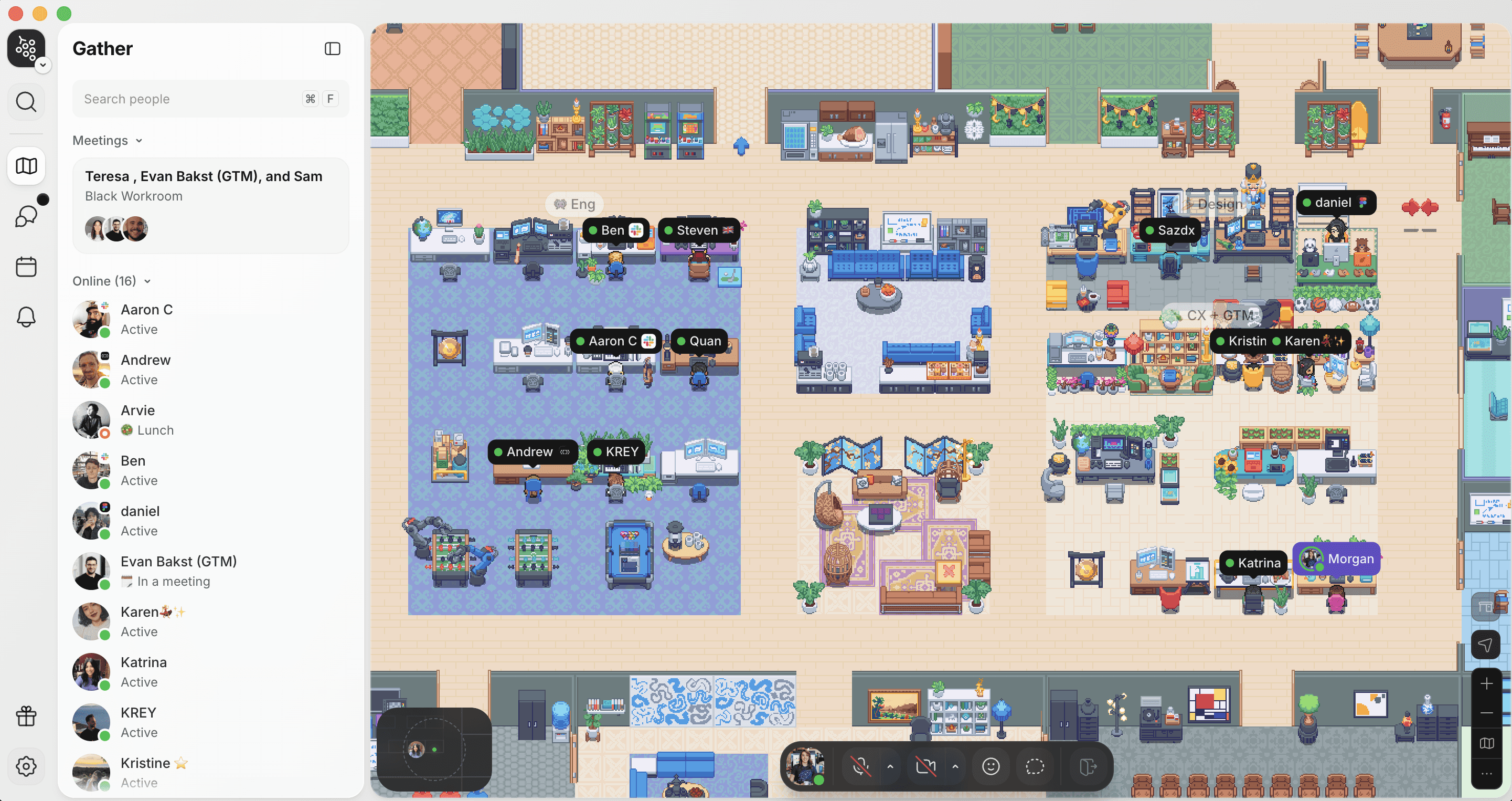
Uma captura de tela do Gather 2.0, mostrando a nova interface de usuário, estilo artístico, recursos e controles de áudio.
O sistema de áudio em si foi construído com base em tudo o que aprendemos com o Gather 1.0, com melhorias incríveis adicionadas. Os testes beta antes do lançamento correram super bem e os usuários adoraram. Estávamos super prontos para o lançamento em setembro!
O que não prevíamos: o suporte para o Windows 10 também terminou em setembro de 2025. Isso forçou os usuários a migrarem para o Windows 11, que incluiu uma atualização que mudou a forma como o áudio em tempo real funcionava. A maioria dos nossos testadores beta usava Macs ou computadores de alto desempenho; não testamos o suficiente em hardwares mais modestos ou nesta nova atualização do Windows. Foi aí que as coisas complicaram.
Após o lançamento público, recebemos muitas reclamações de áudio. Ruídos de estalo. Áudio travando e, de repente, acelerando do nada. Chamadas caindo completamente.
Estava bem longe da experiência incrível que planejamos lançar, por isso tornamos esse ajuste nossa prioridade número um!
Diagnosticando o problema
Durante todo o mês de outubro de 2025, nossa equipe tentou todas as otimizações possíveis para a estrutura de áudio existente baseada em JavaScript. Mas, a cada nova atualização que lançávamos, os problemas continuavam sendo relatados.
Um dos desafios é que o processamento de áudio em tempo real em JavaScript tem suas limitações. A coleta de lixo (garbage collection), que é o processo que libera memória não utilizada, pode consumir ciclos de CPU da estrutura de áudio, fazendo com que ela perdesse prazos rígidos de processamento. E sob a carga geral do sistema do Gather 2.0 (um aplicativo que consome bastante recursos), a abordagem em JavaScript simplesmente não conseguia dar conta de forma estável.
Outro desafio era que os usuários que relatavam ouvir estalos no áudio muitas vezes não eram os que estavam com problemas de desempenho no computador. Recebíamos feedbacks de usuários de Mac com máquinas superpotentes reclamando de áudio ruim, quando na verdade o problema vinha de seus colegas de equipe que usavam Windows. Isso confundiu bastante o processo de diagnóstico, tornando mais difícil saber se estávamos realmente progredindo.
Migrando o áudio de JavaScript para C++
A equipe decidiu reestruturar o pipeline de pós-processamento em C++ nativo, integrado diretamente em uma compilação personalizada do Electron. Isso isolaria o processamento de áudio de outras tarefas no navegador (evitando interrupções inesperadas) e melhoraria muito o desempenho geral!
Decidimos implementar isso diretamente no Chromium para rodar a estrutura de áudio em um processo utilitário dedicado via comunicação entre processos (IPC). Dessa forma, ela não precisaria disputar recursos dentro do navegador.
Essa nova configuração finalmente nos libertou das limitações do JavaScript, criando uma estrutura feita sob medida para a prioridade de processamento que o áudio espacial realmente precisa!
"É um exemplo incrível de encarar a complexidade de frente e assumir o controle, o que resultou em grandes melhorias na experiência dos nossos usuários."
Ben Greenier, Engenheiro de Software Sênior II no Gather
A surpresa do Windows 11
Quase ao mesmo tempo, o fim do suporte ao Windows 10 gerou uma onda de migrações para o Windows 11. A nova versão, Windows 11 25H2, trouxe recursos de economia de energia mais agressivos, incluindo um chamado EcoQos.
O EcoQos reduz a prioridade de tarefas em segundo plano diminuindo a velocidade do clock da CPU e a prioridade de agendamento. O problema: quando um usuário do Gather mudava para outro aplicativo (como uma planilha ou o navegador), o Windows entendia que o Gather não estava mais "ativo" e limitava seu desempenho.
Para a maioria dos aplicativos, essa é uma troca justa. Mas para áudio em tempo real, é um desastre!
Um tempo de resposta constante da CPU é indispensável. Com o EcoQos limitando nosso processo, a estrutura de áudio não conseguia acompanhar o ritmo, causando os ruídos de estalo e acelerações repentinas que os usuários relataram.
A solução foi usar o MMCSS (Multimedia Class Scheduler Service), uma API nativa do Windows que permite ao aplicativo avisar o sistema operacional: “Estou fazendo um trabalho urgente; não reduza meu desempenho!”
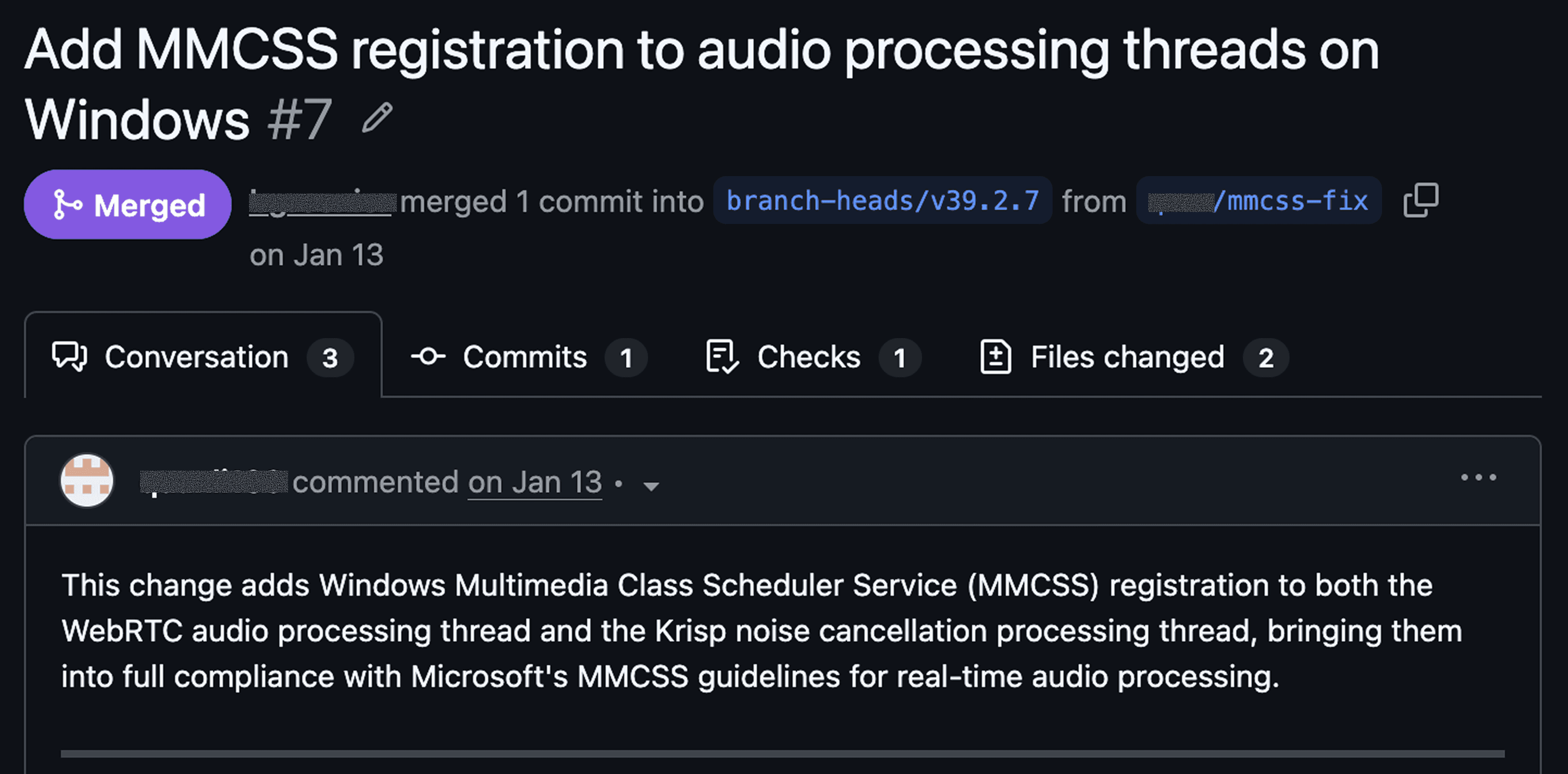
Uma captura de tela do pull request do MMCSS. Conforme essa atualização foi disponibilizada para os clientes, ela levou diretamente a uma redução nas avaliações negativas de AV.
Esse tipo de acesso ao nível do sistema não era possível na estrutura original em JavaScript. Ao mudar para C++, nossa equipe pôde registrar os canais de áudio diretamente no MMCSS, garantindo alta prioridade para o Gather mesmo quando os usuários estão multitarefando ou compartilhando a tela.
Ajustando o cancelamento de ruído
Com a nova estrutura funcionando, a equipe também precisava integrar novamente o Krisp, nosso parceiro de cancelamento de ruído.
Decidimos rodar o SDK do Krisp em um processo separado e fora da sandbox, direcionando o fluxo de áudio pela estrutura existente do Chromium usando IPC. Sentimos que isso seria muito mais seguro e estável caso acontecesse algo com o código do Krisp (ou com o nosso próprio).
Depois que o cancelamento de ruído roda, adicionamos mais uma camada: o post-Krisp AGC (Controle Automático de Ganho), que aumenta o volume da voz do usuário depois que o cancelamento de ruído faz o seu trabalho. É um pequeno detalhe que faz uma diferença enorme na qualidade das chamadas!
Como o AV está agora e para onde estamos indo
O sistema de AV do Gather 2.0 é o mais confiável que já construímos, com as avaliações ruins de áudio e vídeo caindo pela metade desde o lançamento! Mas não se preocupe, não estamos relaxando e dando a missão como cumprida! O desempenho do AV é um investimento de longo prazo, não um projeto com linha de chegada.
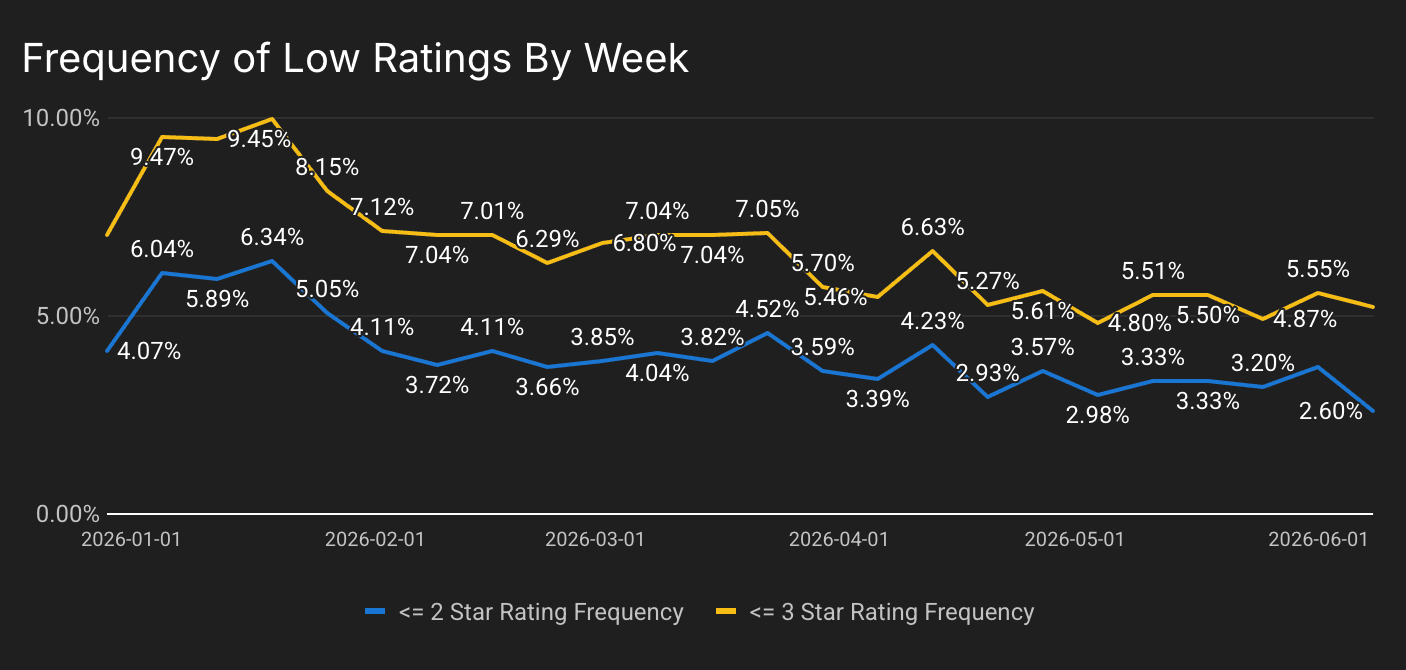
Legenda: Pedimos aos usuários que avaliem a qualidade do áudio em uma escala de 1 a 5 estrelas. Este gráfico mostra a porcentagem de avaliações baixas. Você pode ver um pico após a queda do período de festas de fim de ano, seguido por melhorias constantes à medida que migramos a estrutura de áudio para C++ e resolvemos as mudanças do Windows.
A equipe está trabalhando ativamente para melhorar a velocidade de reconexão, refinar a compensação automática de volume, reduzir pequenos bugs visuais e continuar otimizando tudo em diferentes configurações de hardware. Você pode acompanhar todas as novidades em nosso roadmap e changelog!
A todos que enviaram relatórios de bugs, sinalizaram problemas ou simplesmente continuaram conosco nos momentos mais difíceis: muito obrigado! O feedback de vocês foi o que tornou possível corrigir esses problemas de áudio. Estamos trabalhando duro para continuar construindo o espaço de trabalho mais alegre, dinâmico e produtivo para equipes remotas, e estamos muito felizes por você fazer parte da comunidade Gather!